Opening and Closing

CAUTION: The windows automatically lower slightly when you open or close a door. This is normal and avoids damage to the window when the door opens. If
you manually raise a window when the door is open, ensure it is slightly lowered before closing the door.
Press down on a switch to lower the associated window. Window switches operate at two levels:
- To lower a window fully, press the switch all the way down and immediately release.
- To lower a window partially, press the switch gently and release when the window is where you want it.
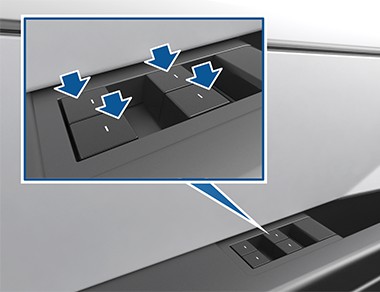
Similarly, pull a switch to raise the associated window:
- To raise a window fully, pull the switch all the way up and immediately release.
- To raise a window partially, pull the switch gently and release when the window is where you want it.
NOTE: If a window is fully lowered and you open the associated door, the window rises slightly. Likewise, if you fully lower a window while the door is already open, it stops slightly above the edge of the door. To fully lower a window while the door is open, press the switch again.
If a window is left open unintentionally, Cybertruck can send a notification to the mobile app (touch Controls > Locks > Car Left Open Notification, then choose Doors & Windows).
However, it is your responsibility to ensure windows are closed after leaving the vehicle; do not rely on notifications to inform you.
Enable Close Windows on Lock by touching Controls > Locks
- Close Windows on Lock to automatically close the windows whenever the vehicle locks.
NOTE: See Cold Weather Best Practices on page 160 for information on preparing windows for cold weather.

WARNING: Before closing a window, it is the driver’s responsibility to ensure that all occupants, especially children, do not have any body parts extended through
the window’s opening. Failure to do so can cause serious injury.

WARNING: Never leave children unattended in Cybertruck.
Locking Rear Windows
To disable the rear window switches, touch Controls > Locks
- Window Lock. Once locked, the rear windows can only be controlled from the driver’s window switch. Touch Window Lock again to re-enable the rear window switches.

WARNING: To ensure safety, it is recommended that you lock the rear window switches whenever children are seated in the rear seats.
Calibrating Windows
In the unlikely event that a window behaves unexpectedly (fails to open or close properly, goes down more than normal when the door opens, etc.), you can calibrate it to potentially fix the issue.
To calibrate a window:
- Close the door with the affected window.
- Sit in the driver’s seat and close the driver door.
- Using the window’s switch on the driver’s door, fully raise
the affected window until it stops.
- Using the window’s switch on the driver’s door, fully lower
the affected window until it stops.
- Repeat step 3 and fully raise the affected window until it stops.
If this does not resolve the issue after performing a few times, use your mobile app to schedule a Service appointment.
UV Index Rating
The windshield, windows, and glass roof in Cybertruck are excellent at protecting you from UV (ultraviolet) rays. The glass components score less than two on the UV Index scale. Review your region’s UV Index specifications for more information.

WARNING: It is the occupant’s responsibility to take the necessary precautions to ensure adequate UV protection.
Sun Visors and Vanity Mirrors
To protect occupants from sunlight coming through the windshield and side windows, flip the sun visor downward.
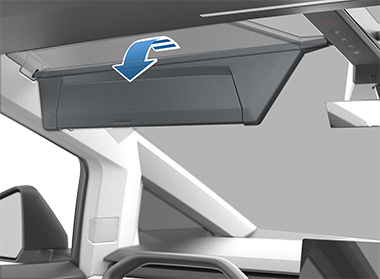
You can lower the extender or pivot the entire sun visor to the driver’s window side provide maximum shade. Simply pull the inboard side of the sun visor out of the magnetic clip and pivot toward the window. Pivot the sun visor to return it back to its initial position and lock in place.
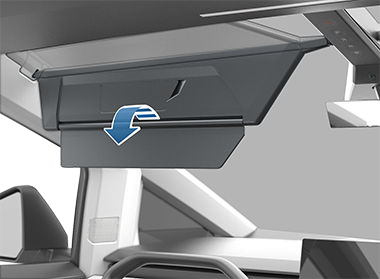
To expose the vanity mirror, lower the visor extender, then lower the mirror cover. While the cover is lowered, the mirror is exposed and lights are illuminated.