Your Cybertruck has three AC power outlets located in the cargo bed.
To access the outlets:
- Open the tailgate (see Cargo Bed on page 60).
- Locate the outlet cover on the left side of the bed.
- Pull the left side of the panel to open the cover.
The outlet cover must be open in order for the outlets to provide power.
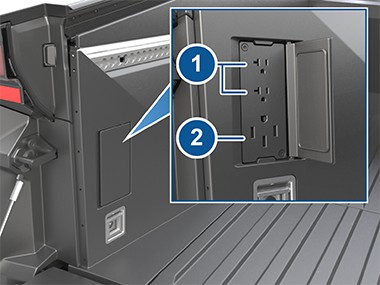
The 120V power outlets provide a maximum of 20A across both cargo bed outlets. This is independent from the 120V outlets in the cabin which also provide a maximum of 20A across both cabin outlets (see Interior Power Outlets on page 21). It is possible to pull 20A from the cabin and 20A from the cargo bed at the same time. All AC power outlets combined (120V cabin, 120V cargo bed, and the 240V cargo bed outlet) are limited to a combined maximum of 40A. If multiple devices are plugged in and drawing power at the same time, power to each device may be reduced or interrupted.
The outlets stop providing power when Cybertruck is no longer occupied (when you leave the vehicle and close the doors).
To enable power to the outlets, touch Controls > Outlets & Mods on the touchscreen. From here you can toggle power to all AC outlets and each power feed (see Connecting Accessories to the 48V Power Feeds on page 212). While
the outlets are supplying power, the touchscreen shows the amount of power being used.
You can also enable power to the outlets and power feeds using the mobile app.
NOTE: Leaving a device plugged in depletes the high voltage Battery. Even if nothing is plugged in, the outlets draw small amounts of power from the Battery whenever they are enabled. When the charge level of the high voltage Battery is very low, power to the outlets shuts off and a message is displayed on the touchscreen. Leaving a device plugged in does not deplete the low voltage battery.
 CAUTION: Do not use the AC outlets to power a device with a power rating that exceeds the limits listed above.
Keep On Cabin and Bed Outlets
If you want the outlets to continue supplying power even when the vehicle is not occupied, touch Controls > Outlets & Mods and enable Keep On Cabin and Bed Outlets. After 12 hours, or once the high voltage Battery has less than 5% remaining energy, the outlets shut off. Keep On Cabin and Bed Outlets is automatically enabled whenever you turn on the outlets using the mobile app.
CyberTent Mode
After installing the CyberTent, enable CyberTent Mode for optimal comfort. CyberTent Mode:
- Levels the suspension.
- Opens the tonneau cover and keeps it open by disabling the switches.
- Displays controls to adjust the front and rear lights.
- Allows outlets to be kept on indefinitely.
NOTE: Using CyberTent Mode and keeping the outlets or lights on may increase power usage.
- Disables walk-away lock.
NOTE: It is your responsibility to ensure the vehicle is appropriately locked or attended to at all times.
To enable, touch Controls > Outlets & Mods > CyberTent Mode. Cybertruck cannot be driven while CyberTent Mode is enabled.
Overload Capability
The AC outlets on Cybertruck are all capable of providing additional surge current to start almost all devices (such as power tools, motors, and compressors) up to 110LRA.
Troubleshooting AC Outlets
AC outlets may be disabled in the following scenarios:
- Very low ambient temperatures.
- When an AC charging cable is connected to Cybertruck even if the vehicle is not actively charging.
- The high voltage Battery does not have enough charge.
-
 GFCI or overcurrent detection has been tripped.
and take care to ensure proper handling. Misusing outlets can cause serious injury. |
corroded or damaged, do not use them. |
|
cable, causing the outlets to become wet. |
|
not in use. |
 WARNING: Do not insert any objects into the outlets other than electrical plugs. Treat the outlets on Cybertruck the same as you would any other outlet,
 WARNING: Protect the cargo bed outlets from moisture, water, and foreign objects at all times. If you see a foreign object in an outlet, or if the outlets appear
 WARNING: Do not use the cargo bed outlets if they are wet or covered in snow.
 WARNING: If rain falls while an accessory is plugged in and drawing power from the cargo bed outlets, do not allow rain water to run along the length of charge
 WARNING: Do not connect a power source (such as a solar panel or external battery) to a cargo bed outlet.
 WARNING: As with any power outlet, do not leave children unattended near the cargo bed outlets and ensure the outlet cover is closed when the outlets are
 If one or more outlets unexpectedly stops providing power, first ensure that you have enabled power to the outlets (touch Controls > Outlets & Mods) and that the high voltage Battery has enough remaining charge.

 Each power outlet in Cybertruck is equipped with overcurrent detection and a ground fault circuit interrupter (GFCI), which interrupts the power supply to an outlet if an issue is detected, such as a current leakage. In this case, the outlets will turn off. Overcurrent detection may happen if multiple devices plugged in at once draw too much power from the AC power outlets.

 CAUTION: Use only “UL” Listed devices with the AC power outlets in Cybertruck.

 CAUTION: Damage to a device or data loss (such as from a laptop or external drive) due to a sudden loss of power is not covered by the warranty.
If an outlet is still not providing power, the GFCI or overcurrent detection may have been tripped. When an outlet is faulted, an option to reset the outlets becomes available.
To reset:
- Disconnect all devices from all AC outlets (three outlets in the cargo bed and two in the center console).
- Touch Controls > Outlets & Mods > Reset.
- Reconnect devices and re-enable power to the outlets by touching Controls > Outlets & Mods > AC Outlets.
NOTE: Power to AC outlets is still available when Cybertruck is DC charging (while Supercharging, for example). See Charging Instructions on page 176.
Warnings and Cautions
|
|
AC charging may be disabled if moisture enters one of the outlets. |
|
that all objects in the cargo bed are properly secured (see Securing Cargo on page 62). |
become hot. Use caution when unplugging a device. |
 CAUTION: Always check each outlet for damage before use.
 CAUTION: Keep the outlet cover closed when the cargo bed outlets are not in use.
 CAUTION: Keep the outlet cover closed when Cybertruck is AC charging, especially in wet weather.
 CAUTION: Damage to Cybertruck caused by an external device that is plugged in to an outlet is not covered by the warranty.
 CAUTION: Use caution when driving Cybertruck while devices are plugged into the cargo bed outlets. Ensure
 WARNING: A power outlet and a device’s plug can